Content Strategy
Why Posting More Isn’t the Answer: Grow Smarter in 2026
July 9, 2026
Your content isn't lacking quality, it's lacking the right signals. Learn how to capture and use audience feedback to boost your content, week after week.
Most creators don’t have a “content quality problem”—they have a signal problem. Your audience is already telling you what’s working, what’s confusing, and what they want next. The difference is whether you can capture that feedback, interpret it fast, and turn it into better videos, posts, and offers.
This guide shows you how to use feedback from your audience as a quality booster: not by chasing every comment, but by running a repeatable process that improves results week after week.
Random comments are “nice,” but they’re rarely actionable. You want feedback that points to decisions: what should you make more of, cut, simplify, or change. Start by designing feedback prompts that ask for specifics.
Use a three-part structure in your calls-to-action:
Context: “If you watched until the end…”
Question: “What part made you stop / rewatch?”
Outcome: “What would you want in the next video?”
Example: after a short-form tutorial, pin a comment that says: “Be honest—what step did you find confusing? Reply with the timestamp or ‘Step 2’ and I’ll remake it clearer.” That yields step-level feedback instead of generic “great video.”
Also, diversify where feedback comes from. Don’t rely only on comments. Consider: story polls, community posts, email replies, and DM questions. If you only check one channel, you’ll miss different segments of your audience. One creator I worked with found that their Instagram audience asked “what tools to use,” while their email subscribers asked “how to apply the strategy to their niche.” Both were valid, but each informed a different content lane.
To make feedback a quality booster, you need a pipeline that turns raw responses into concrete edits. Here’s a workflow you can run in under 30 minutes after each content cycle.
Step 1: Capture—collect feedback into one place. A notes doc, spreadsheet, or CRM-style tracker works. Include the date, platform, and the content link or post title.
Step 2: Tag—use 5 tags max. For example: Hook, Clarity, Value, Format, CTA/Offer. When someone says “I didn’t understand the first 3 seconds,” that’s Hook + Clarity. When someone says “the template helped me,” that’s Value.
Step 3: Prioritize—apply a rule: if 3+ people mention the same issue or request in a week, it becomes a Top Priority. If it’s only 1 person, treat it as a test idea, not a redesign.
Step 4: Ship—turn the top feedback into a change you can deliver immediately. Examples:
Clarity: add a “before/after” example in the first minute.
Format: switch from voiceover to on-screen steps or add captions with key terms.
Offer: move the CTA earlier, or offer a lead magnet that matches the confusion (“free checklist for Step 2”).
This is how feedback becomes a content creator workflow rather than a distraction. Over time, your output improves because you’re systematically removing friction.
Feedback feels powerful, but it must show up in performance metrics. The goal isn’t to “feel validated”—it’s to get measurable improvements in engagement, retention, and conversion.
Track feedback-driven metrics across three layers:
Layer A: Early signals (first 1–5 seconds, or first scroll)
If comments say your hook is weak, measure thumb-stopping indicators: average view duration, first-second retention (platform analytics where available), and saves/shares. A small change here can outperform bigger changes later.
Layer B: Mid signals (watch time, replays, comprehension)
If people say they got value, measure average watch time, completion rate, and rewatch behavior. On YouTube, better retention can increase the chances the video is recommended—especially when you improve “how to get more views” factors like audience satisfaction.
Layer C: Conversion signals (email replies, link clicks, DMs, sales)
If your audience asks for templates, measure how your lead magnet performs. If they request a product, measure click-through and purchases.
Practical measurement approach: run feedback changes as controlled “micro-tests.” For example, create two versions of the next video opener. Version A includes the problem statement in 8 seconds; Version B uses a quick story + payoff in 8 seconds. Collect comments after posting, but also compare performance metrics. If Version B earns more retention and more “which part helped” replies, you’ve got a real signal—not a vibe.
For creators thinking about long-term growth, this also feeds future strategy around the YouTube algorithm 2026. You don’t “hack” the algorithm—you improve the viewer experience based on direct audience input, and that tends to drive the satisfaction signals platforms look for.
Some feedback is gold. Some feedback is noise. The quality booster is knowing the difference. Criticism usually falls into three buckets:
Bucket 1: A real friction point—“I don’t get the terminology,” “the pacing is too fast,” “the CTA is confusing.” This is actionable.
Bucket 2: Preference differences—“I like longer videos,” “I hate jump cuts,” “I prefer a different style.” This can be useful if it’s aligned with your target audience, but not if it dilutes your brand.
Bucket 3: Unqualified complaints—“this creator is annoying,” “your niche is irrelevant.” Ignore these or respond calmly once, then move on.
A reliable filtering rule: Is the feedback specific enough to implement? If yes, test it. If no, it’s probably sentiment rather than signal.
When you do respond to criticism, keep it constructive and transparent. Example response template: “Thanks for calling that out—based on your comment about the intro, I’m going to rewrite the first 10 seconds and add a quick example. If you watch the next one, tell me whether it’s clearer.” This transforms negativity into a feedback loop.
Also, avoid “feedback drift.” When you constantly chase the loudest comment, you risk shifting your content identity. Instead, tie feedback to a few consistent content promises (your audience’s expectations). If your promise is “clear tutorials,” then feedback that improves clarity belongs. Feedback that changes your niche or style without improving clarity might not.
For creators starting out or transitioning content lanes, this disciplined approach pairs well with social SEO: how to get found without going viral, because clarity and repeatable value help you rank and get discovered—not just “trend.”
Feedback isn’t just for fixing existing content—it’s also an idea engine. Every “I wish you covered…” comment is a topic request. Every “can you share the template?” message is a potential digital product.
Turn requests into a content idea bank using three steps:
Step 1: Capture the exact wording people use. The phrasing matters because it matches how they search and think.
Step 2: Map to a format—tutorial, breakdown, case study, myth-busting, or checklist. If people ask for steps, format it as a guide. If they ask for examples, create a teardown.
Step 3: Match to an offer stage
Early stage: lead magnet or “mini” tutorial.
Mid stage: template, worksheet, or workshop.
Late stage: paid course, coaching, or a subscription.
This is how you can sell digital products creator ideas without guessing. If your audience repeatedly asks for “the exact checklist,” bundle that into a downloadable. If they ask “what tools should I use,” create a curated toolkit (even if it’s simple). When your offer aligns with feedback, you get higher conversion because you’re responding to an existing demand signal.
And for those interested in passive income for content creators, the most stable products often come from the questions you answer repeatedly. Feedback tells you what’s worth packaging and promoting consistently.
If you want a simple way to structure your next month, build a plan around the top 10 feedback themes. Then schedule content that addresses each theme across multiple formats. Consistency becomes easier because your content roadmap is derived from real audience needs—rather than random inspiration.
Feedback is the fastest way to reduce creative uncertainty: it tells you what the audience understands, what they don’t, and what they’re ready to buy.
iBuildInfluence supports this “feedback-to-action” process with tools that help you capture signals, plan improvements, and measure results. For example, Social Statistics lets you see what your audience actually responds to across platforms (saves, shares, engagement rate), so you’re not relying on subjective impressions when deciding which feedback to act on next.
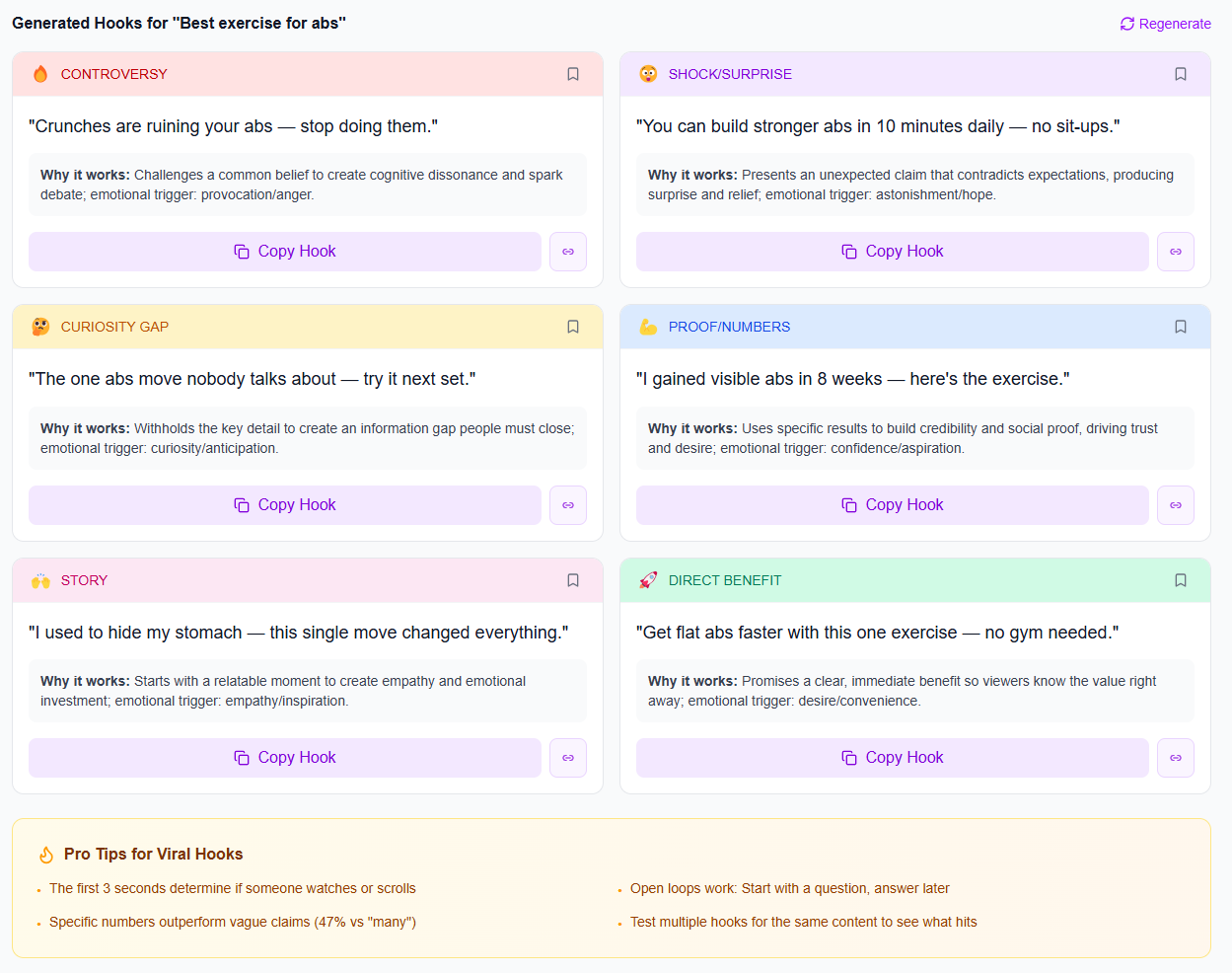
To make applying feedback faster, use Hook Lab to generate and score hook options based on your topic, then iterate on the exact “hook” issues people mention. You can also turn feedback-driven ideas into full assets using Content Generator, then schedule them using Content Planner & Content Queue—so improvements aren’t delayed until “later.”
Ask specific questions after a clear moment in your content—like “What part confused you?”—and give a simple reply format (e.g., “Reply with Step 2”). Keep requests short and tied to a follow-up you will actually deliver. Consistency also helps: you become known as someone who improves based on audience input.
Use a pipeline: capture feedback, tag it (Hook, Clarity, Value, Format, CTA), prioritize items mentioned by 3+ people, then implement one change per next content cycle. After posting, measure early and mid signals like retention and saves, and repeat what performs.
Acknowledge the concern briefly, clarify what you’ll change, and invite a follow-up: “If you rewatch the next one, tell me if it’s clearer.” Avoid long debates. If the comment is nonspecific or unconstructive, don’t turn it into a content direction—use it as a reminder to focus on actionable signals.
Design feedback prompts that ask for specifics (not generic praise), and collect input across multiple channels.
Use a simple pipeline: capture → tag → prioritize → ship—so feedback becomes a repeatable content creator workflow.
Measure impact with performance signals (retention, saves/shares, conversions) to avoid guessing.
Filter criticism by whether it’s actionable and aligned with your content promise.
Turn recurring questions into new content themes and sell digital products creator opportunities, including downloadable templates and toolkits.
Found this helpful? Share it:
iBuildInfluence Team
Creator growth strategist at iBuildInfluence. Helping content creators land brand deals, grow their audience, and build sustainable creator businesses.
More from iBuildInfluenceJoin thousands of creators using iBuildInfluence to land brand deals, grow their audience, and build real income.
Start Free ΓÇö No Credit Card Required