Platform Growth
How Small Channels Can Beat Big Creators (Smart Strategies)
July 25, 2026
Launch your YouTube channel the right way! Build a solid foundation for growth and unlock powerful features from day one to achieve lasting success.
Dreaming of YouTube stardom, a thriving community, and a steady income stream? Every creator's journey starts with a single, crucial step: setting up your channel the right way. It's more than just uploading a video; it's about building a solid foundation that supports your growth, protects your brand, and unlocks powerful features from day one.
This article will guide you through the essential steps to create a YouTube channel designed for influence and long-term success. From choosing the right account type to unlocking critical features, we'll ensure you're equipped to make your mark on the world's biggest video platform.
Before you even think about hitting 'record', you need to establish your YouTube presence. This process begins with a Google account, which serves as the backbone for your entire YouTube operation. If you already have one, great! You can skip to the next step. If not, navigating to YouTube.com and clicking "Sign In" will prompt you to create one.
Here's where many beginners make a critical oversight. When Google asks if the account is "For myself" or "To manage my business," always choose "To manage my business." This isn't just for established companies; it's how YouTube designates a "Brand Account" – a non-negotiable for serious creators. A Brand Account provides significant advantages that a personal account simply can't match:
Multiple Users: Allows others (editors, managers, virtual assistants) to access your channel without needing your personal Google login, protecting your privacy and security. This is essential as your content creator business plan scales.
Separate Identity: Your YouTube channel name can be completely different from your personal Google account name. This is crucial for branding and maintaining a professional image.
Flexibility for Growth: Should you ever want to sell digital products creator services or pivot your brand, a Brand Account offers more options for transfer and management.
After selecting "To manage my business," you'll fill out your personal details (which won't directly show on your channel). If you need a new Gmail address, Google makes it easy to create one during this process. Choose a strong password, add a recovery email, agree to the terms, and your Google account is all set. When prompted about adding a business profile, select "Not Now" – we're heading straight to YouTube.
With your Google Brand Account established, it's time to officially create your YouTube channel. Head back to YouTube.com, click your profile icon in the top right, and select "Create a channel."
You'll see a prompt: "Your creator journey begins." Click "Get started." Here, you'll have the option to "Use your name" or "Use a custom name." Because you wisely chose a Brand Account, you can now confidently select "Use a custom name." This is your opportunity to define your brand identity on YouTube.
Pro Tip: Your channel name is your first impression. Choose something memorable, relevant to your niche, and easy to spell. Research competitors and ensure your desired name isn't already taken or too similar. Think about longevity – will this name still make sense if you transition from a side hustle to full time content creation?
Input your desired channel name, check the box confirming you understand, and click "Create." Congratulations, you've officially launched your YouTube channel! Remember, even with a Brand Account, you can change your channel name later through your YouTube Studio settings if needed, though it's best to start strong.
You've got a channel, but to truly operate like a professional creator and unlock key growth features, you absolutely must verify your account. This single step grants you access to capabilities that are crucial for getting how to get more views and engaging your audience effectively.
Why Verification is Non-Negotiable:
Custom Thumbnails: This is arguably the most important feature. Custom thumbnails are your video's billboard, directly influencing click-through rates. Without them, you're severely limiting your visibility on YouTube.
Videos Longer Than 15 Minutes: Essential for tutorials, vlogs, long-form reviews, and deep dives.
Live Streaming: Connect with your audience in real-time, build community, and answer questions live.
Appeal Content ID Claims: Protect your content and resolve any copyright disputes more effectively.
Here’s how to verify your channel:
Go to YouTube.com and click your profile icon, then select "YouTube Studio."
In the left-hand menu, scroll down and click "Settings."
From the settings menu, click "Channel."
Navigate to the "Feature Eligibility" tab.
You'll see "Default features" are already enabled. Under "Intermediate features," click the dropdown arrow.
Select "Verify phone number."
Choose your country and how you'd like to receive the verification code (text message is usually fastest). Enter your phone number.
Enter the 6-digit verification code you receive via text.
Click "Submit."
Your YouTube account is now verified! This simple step is a game-changer for your content strategy and engagement potential. For more insights on maximizing your video visibility, check out our guide on YouTube Algorithm 2026: How to Get More Views Consistently.
Many successful creators eventually branch out, creating secondary channels for different types of content, vlogs, gaming, or even specific niches that don't fit their main brand. Good news: if you set up a Brand Account initially, creating additional channels is remarkably simple and automatically gives them the same Brand Account benefits.
To create another YouTube channel:
Click on your profile icon in the top right corner of YouTube.
Go to "Settings."
In the "Your Channel" section, click "Add or manage your channels."
On the next page, click "+ Create a new channel."
You'll be prompted to enter a new channel name.
Click "Create," and your new Brand Account channel is ready!
This flexibility allows creators to effectively manage a diverse portfolio of content, catering to different audience segments without diluting their primary brand. It’s a smart strategy for creators looking to eventually transition from side hustle to full time income, diversifying their content and revenue streams.
Now that your channel is perfectly set up and verified, the real fun begins: creating content! While this article focuses on the technical setup, remember that consistency and quality are paramount for growth.
Before your first upload, consider these initial steps:
Profile Picture: Upload a clear, professional, and recognizable profile picture or logo that represents your brand.
Channel Banner: Design an eye-catching channel banner that communicates what your channel is about, your upload schedule (if consistent), and any social media handles.
Your First Video: Don't wait for perfect equipment. Use what you have, whether it's your smartphone or a basic webcam. The goal is to start creating and learning. Remember, the first 5 seconds is everything for viewer retention. Check out our insights on The First 5 Seconds Is Everything — A Creator's Guide to Viral Hooks.
Don't get bogged down by perfectionism. The most important thing for new channels is to "just press record." Focus on delivering value, telling your story, or sharing your expertise. As you grow, you can invest in more sophisticated content creation tools 2026. To manage your output, having a solid content creator workflow is key. Tools like a content planner will become indispensable.
Always choose a "Brand Account" when setting up your Google account for YouTube to ensure flexibility, security, and future growth potential.
Verify your YouTube channel immediately to unlock crucial features like custom thumbnails, longer videos, and live streaming.
Strategically name your channel to reflect your brand and niche, as it’s a critical component of your online identity.
Leverage the ability to create multiple channels from a single Brand Account to expand your content empire without diluting your main brand.
Don't delay creating content; start with what you have and focus on consistency and learning.
Getting your YouTube channel set up is just the beginning. iBuildInfluence is designed to support creators at every stage, turning your creative passion into a sustainable career. Our platform offers a suite of tools to help you manage your entire creator workflow, from idea generation to audience growth and income generation.
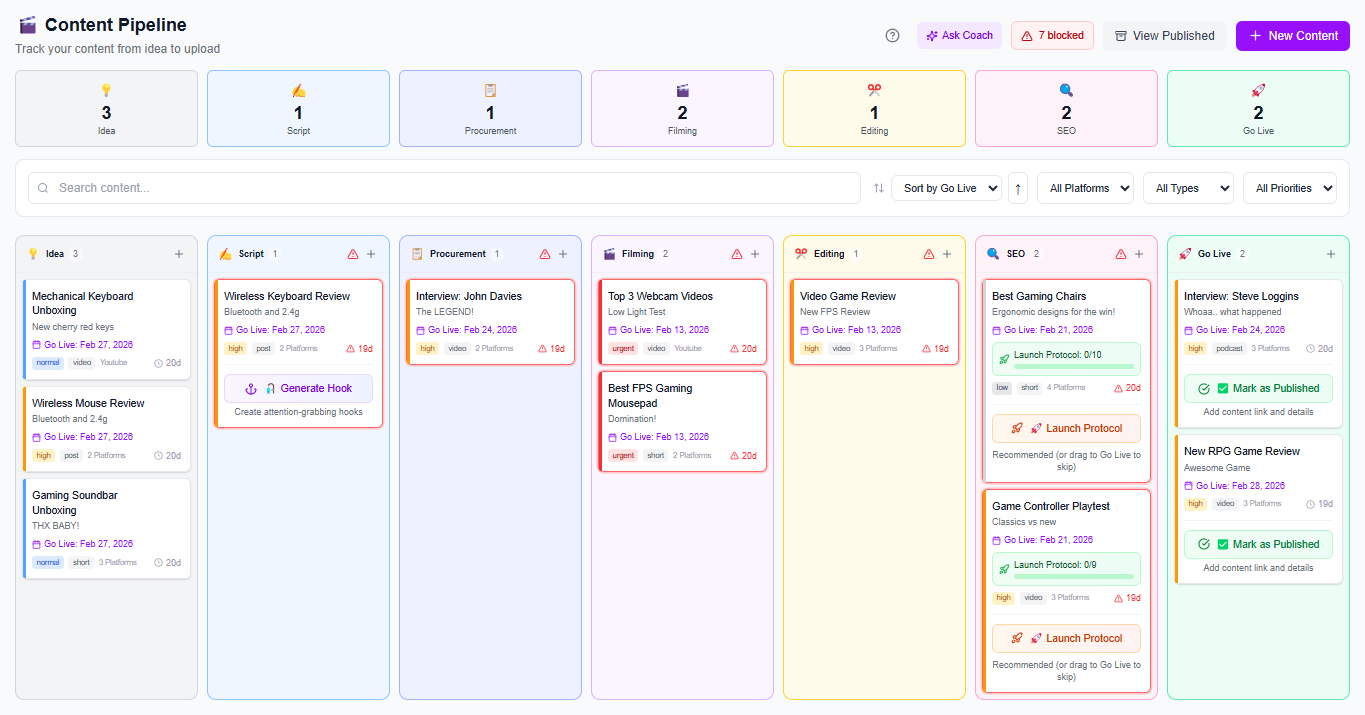
For getting started with content ideas and planning, our Content Generator can help you brainstorm video topics, scripts, and captions, ensuring you never run out of engaging material. Once you have your ideas, the Content Planner & Content Queue allows you to plan weeks of content, auto-schedule uploads, and maintain the consistency essential for YouTube growth. And when you're ready to monetize, tools like our Pitch Machine and Revenue Pipeline will help you land and track brand deals, transforming your audience into a source of substantial income.
Creating a YouTube channel correctly from the outset sets you up for success, allowing you to focus on what you do best: creating incredible content. By understanding the strategic choices, like opting for a Brand Account and verifying your channel, you're building a robust foundation that will serve you well as you grow your audience and build your influence.
Don't let the technical steps intimidate you. Follow this guide, take action, and start your journey today. Your audience is waiting!
Found this helpful? Share it:
iBuildInfluence Team
Creator growth strategist at iBuildInfluence. Helping content creators land brand deals, grow their audience, and build sustainable creator businesses.
More from iBuildInfluenceJoin thousands of creators using iBuildInfluence to land brand deals, grow their audience, and build real income.
Start Free