
Content Strategy
How to Get Brand Deals with Under 10K Followers (The Micro-Influencer Guide)
October 10, 2026
Learn how to invoice brands using 50/50 and Net 30 terms, plus what to do when they go silent.
Getting brand deals is exciting—until the payment part starts feeling like a second job. Whether you agree on a 50/50 split or Net 30, your invoicing process determines how fast cash lands in your account. This guide shows you exactly how to invoice a brand, structure payment terms, and respond when they “forget” to pay.
Before you create an invoice, lock the payment terms in writing. For influencer work, the most common structures are 50/50 (deposit upfront, remainder after delivery) and Net 30 (full payment due within 30 days of an agreed trigger). If the brand doesn’t clearly state terms like “after approval” or “after posting,” your invoice may be “technically correct” but practically slow.
Use specific triggers that match how creators actually deliver. Examples: 50/50 - 50% upon contract signature and invoice receipt - 50% upon final asset delivery (e.g., edited video sent) or after campaign goes live (choose one and define it) Net 30 - Net 30 days from “date of invoice” - or Net 30 days from “date of acceptance” (approval in writing), which reduces back-and-forth
Practical step: include two dates in your contract or deal notes—(1) when you invoice for the deposit (e.g., contract signing) and (2) when the final payment is triggered (e.g., “final deliverables delivered via email by May 10”). This makes invoicing objective, which matters when they ghost.
A 50/50 deal should result in two invoices (or one invoice split into two line items, but two is cleaner for accounting). Brand AP teams typically prefer invoices that are easy to match to contract terms—reference the contract, the deliverable(s), and the payment schedule.
Here’s a real-world approach you can copy: Invoice 1 (Deposit) - Invoice title: “Deposit Invoice – [Brand] – [Campaign Name]” - Due date: “Due upon receipt” (or per your agreement) - Amount: 50% of total fee - Line items: “Creator services (deposit for [date range])” - Include: contract date/ID, your business name, and the bank/payment method
Invoice 2 (Final) - Invoice title: “Final Invoice – [Brand] – [Campaign Name]” - Trigger: “Due Net X days after deliverables approval” OR “due upon delivery” (use what you agreed) - Amount: remaining 50% - Line items: list the deliverables clearly (e.g., “2 short-form videos,” “1 thumbnail set,” “1 usage rights transfer” if applicable)
Make your “deliverable completion” measurable. If you’re waiting on approvals, define what counts as approval. For example: “Approval via email within 3 business days or deemed approved.” If they delay approvals, you still have a clear basis to invoice the final payment.
Net 30 doesn’t mean they pay exactly on day 30 every time—but it does mean you need to be precise about what “Net 30” starts from. In creator-brand work, the start date often gets disputed: is it the day you sent the invoice, the day you delivered, or the day they approved? Reduce ambiguity by stating the invoice start date in the invoice terms.
Choose one: - Net 30 from invoice date (simplest for you) - Net 30 from acceptance date (safer if payment depends on deliverables approval)
Include this exact sentence near the payment terms section: “Payment terms: Net 30 days from [invoice date / acceptance date], payable to [your business name].”
Then include a “crosswalk” line in the invoice notes: “Campaign deliverables delivered on [date]. Contract reference: [ID].” AP teams love clarity because it shortens internal approval cycles. If your work includes usage rights or whitelisting, add a line item for that too—otherwise they may pay for production but dispute rights.
Tip: send the invoice immediately after the trigger event. If the trigger is “delivery,” email the invoice the same day you send your final deliverables. If the trigger is “approval,” request written approval (email is best). Otherwise, you may be waiting for a vague “we’ll review it” that never ends.
Your invoice should function like a mini contract summary. If it’s missing basic details, brands send it back to you, which resets timelines and invites delays. Think of your invoice as both a request for payment and a record for accounting.
Use this checklist: 1) Your info: business/legal name, address (if applicable), email, phone, tax ID/VAT ID (as required by your country), and invoice number. 2) Their info: brand legal name, billing email or AP contact (if you have it), and billing address if known. 3) Reference details: contract ID, campaign name, and deliverable list. 4) Clear money terms: total amount, tax if applicable, payment terms (50/50 or Net 30), due date, and bank/payment instructions. 5) Attachments: proof of deliverables (links, screenshots, posting evidence) and the signed brief/contract if requested. 6) Payment method: ACH/wire/PayPal—whatever you accept—and the fastest path for payment.
Real numbers matter. If your total fee is $2,500, show: - Invoice 1: $1,250 (50% deposit) - Invoice 2: $1,250 (remaining 50%) If Net 30 is agreed, write “Due by [date calculated from trigger].” Brands are more likely to process on time when your invoice already does the math.
Also consider what you charge for. If your contract includes editing revisions, make sure your invoice line item reflects the scope (e.g., “2 revisions included”). If you’re adding rush fees or additional deliverables, it should appear as separate line items to avoid “scope creep” disputes.
Ghosting usually isn’t personal—it’s often bureaucratic confusion, delayed approvals, or a missing AP handoff. But the outcome is the same: you don’t get paid. The goal is to switch from friendly reminders to structured escalation that makes non-payment harder to justify.
Use this 7-step workflow: Step 1: Confirm the trigger. Write down the exact date you delivered and when the invoice was sent. Save the email threads and any approval messages. Step 2: Send a “payment due” reminder 3–5 business days after the invoice becomes due (or after the agreed Net 30 window begins). Step 3: Ask for the AP status, not the reason. Example: “Can you confirm whether invoice INV-104 has been routed to accounts payable and the expected payment date?” Step 4: Offer a simple resubmission. If they claim they didn’t receive it, resend the invoice PDF and any attachments in one email. Step 5: Escalate to the contract owner. If the project manager is unresponsive, contact the person who signed the agreement or their manager. Step 6: Send a “last notice” with documentation. State the amount due, invoice number, contract reference, deliverables date, and your payment terms. Keep it factual. Step 7: Protect your payment. If allowed by your contract and local law, mention collection/legal options or pause further work until payment is resolved.
Practical templates help. Here’s a compact message you can send at Step 2: “Hi [Name], quick check-in on invoice INV-[#] for [Campaign]. The invoice was sent on [date] and terms are [Net 30 / due upon receipt]. Could you share the current AP status or the expected payment date? Thanks—happy to resend if needed.”
Statistics you can use for internal planning: in many industries, payment delays of 30–60+ days are common when invoicing details are unclear or when deliverables are disputed. The fix is clarity upfront and documentation trails—your invoice should already contain everything they need to process payment without guessing.
“When payment gets delayed, the fastest fix isn’t a louder email—it’s a clearer paper trail.”
Invoicing goes smoother when your delivery documentation, contract notes, and deal history live in one place—so you can quickly prove what was delivered and when. With iBuildInfluence, you can manage deals through the Deal Pipeline / Revenue Pipeline, tracking each stage from pitch to payment. When a brand ghosts, you’re not hunting through threads—you can pull the exact invoice-ready context instantly.
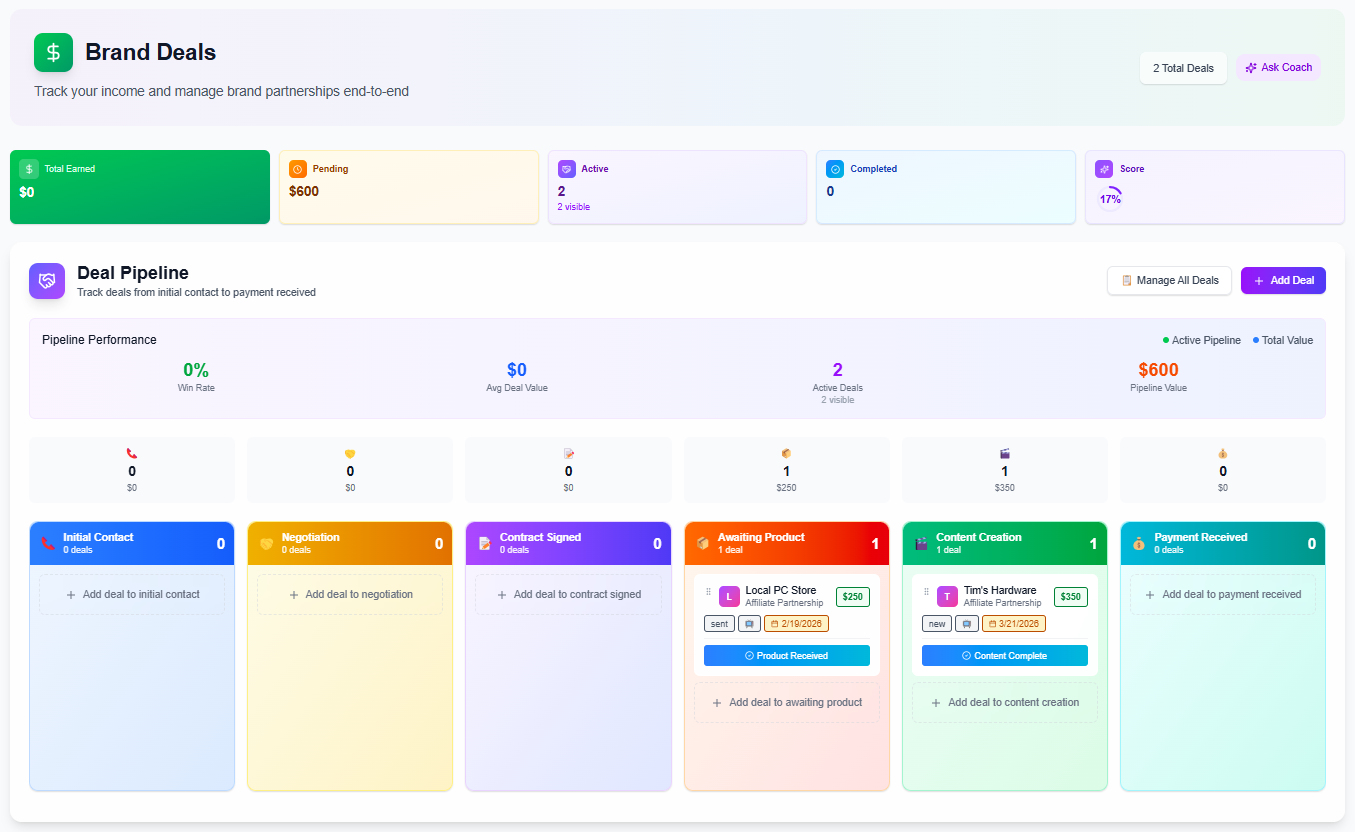
iBuildInfluence also supports creator business operations that directly impact pay speed: the Media Kit helps you show live stats and credibility during approvals (reducing “we need more info” delays), and the Contracts & Invoices workflow helps you standardize invoice creation and contract references so your terms (50/50, Net 30) are consistent every time. If you’re moving toward a more stable creator income model, this kind of systems-first workflow is one of the best “content creator business plan” upgrades you can make.
Include your business details, invoice number, contract/campaign reference, clear deliverable list, amounts (including taxes if applicable), and payment terms (50/50 or Net 30). Add payment instructions and, if relevant, links or proof of deliverables. The clearer and more complete the invoice, the less likely the brand is to reject it internally.
Define the trigger in your agreement: Net 30 from invoice date or from written acceptance. If approval is required, request confirmation via email and document any review feedback within agreed timelines. If they don’t approve within the specified window, use the contract language to invoice based on “deemed acceptance” (if included).
Follow a structured escalation: reminder, AP status request, resubmission with attachments, escalation to the contract owner, then a final notice citing invoice number and contract terms. Keep everything factual and time-stamped. If needed, pause future deliverables and reference any collection/legal steps allowed by your contract.
Set payment terms and invoice triggers in writing (deposit vs. delivery vs. approval).
For 50/50 deals, send two invoices with clear deliverables tied to each payment.
For Net 30, specify whether it starts on the invoice date or the acceptance/delivery date.
Use an invoice checklist (references, deliverables, amounts, payment instructions) to prevent AP back-and-forth.
If they ghost, escalate with a 7-step documented workflow instead of repeated vague check-ins.
Found this helpful? Share it:
iBuildInfluence Team
Creator growth strategist at iBuildInfluence. Helping content creators land brand deals, grow their audience, and build sustainable creator businesses.
Try iBuildInfluence