Content Strategy
Brand Deal Pitch Email Templates That Get Replies (2026)
October 8, 2026
Use this creator content calendar template for a repeatable week: hooks, posting schedule, repurposing, and performance checks you can actually keep.

If your content calendar feels like a to-do list you’ll never finish, you’re not alone. Most creators don’t need “more planning”—they need a repeatable week that turns ideas into posts, then into feedback and income. Here’s a creator content calendar template for a full week you can keep, with specific prompts, posting blocks, and simple performance checks.
Your goal with a content creator business plan isn’t to post constantly—it’s to build a content system that keeps producing. A strong week has three jobs: (1) teach (value), (2) prove (credibility/case study), and (3) convert (CTA to email, product, or brand inquiry). When those show up every week, your channel doesn’t rely on luck.
Here’s the structure for the week you’ll repeat: 1 flagship piece (often YouTube or a long-form post), 2 supporting posts (short-form clips or carousel), and 2-3 community/engagement posts (comments, Stories, or short text posts). The remaining time is for repurposing and measurement. In practice, many creators find that 5–7 posts per week across platforms is enough to stay consistent—without burnout. For example, if you publish one main YouTube video every week (or every other week), you can create 6–10 short clips from it and schedule them.
Use this as your baseline week. Adjust based on your audience time zone, but keep the roles of each day. Below is a realistic example for a creator who wants “how to get more views” growth and also wants to sell digital products creator offers (like templates, mini-courses, or coaching resources).
Monday (Planning + Hook Mining | 45–60 minutes)
Pick one topic you can go deep on (e.g., “YouTube SEO checklist: titles, descriptions, & tags for more views (2026)”). Then create 3 hook angles and choose the best one. Your hook doesn’t have to be clever—it has to be specific. Example hook angles: “Stop losing views to weak titles,” “A 10-minute SEO update that fixes your impressions,” “The exact checklist I use before publishing.” Use Hook Lab to generate and score hooks for your topic so you’re not relying on guesswork.
Tuesday (Flagship Post | 60–90 minutes)
Create or publish your flagship piece. If you’re on YouTube: record/edit one video segment (or full video) and publish. If you’re on TikTok/IG: post a “Teach + Proof” carousel or short video that includes (a) a clear framework, (b) one real example, and (c) a simple takeaway. A practical format: 15–30 seconds of problem, 45–60 seconds of steps, and 15 seconds of “try this today.”
Example CTA: “Comment ‘CHECKLIST’ and I’ll send the free version” (leads to email later).
Wednesday (Short Clip Repurpose | 45–75 minutes)
Turn one segment from Tuesday’s flagship into a short clip. Keep it under 30–45 seconds. Use on-screen text for the main line and add a second line with a quick proof (e.g., “This raised CTR on my last video”). Studies on retention consistently show that early clarity and readable overlays improve watch-through for short-form. Even if you don’t have “data” yet, you can show “process proof”: “Here’s what I changed and why.”
Thursday (Community Post + Micro-Offer | 30–45 minutes)
Engage with your audience like you already know them. Post a question that makes people reply with experiences, not just likes. Example: “What’s hardest: hooks, titles, thumbnails, or consistency?” Then follow up in comments for 20–30 minutes.
If you have an offer, introduce it softly. For instance: “I made a simple weekly calendar template—DM me if you want it.” This is where you start building a creator email list without sounding salesy. If you already have digital products creator resources, point to a free lead magnet first.
Friday (Supporting Post: Case Study | 60 minutes)
Publish a supporting piece with proof. Example: “From views to income: what changed when I fixed my monetization flow.” Even if you’re not large yet, share tangible observations: watch time trends, CTR improvements, or how you adjusted posting times. If you want internal inspiration, the post From Views to Income: Optimize Your YouTube Monetization Strategy is a helpful reference for making your content tie to outcomes.
Saturday (Repurpose + SEO/Discovery Post | 45–75 minutes)
Create one more piece aimed at discovery. For YouTube, this can mean publishing a video description update, posting a “related resources” short, or optimizing a thumbnail concept for a future video. For text-based platforms, write a “how it works” post (framework + example). If you’re actively targeting the YouTube algorithm 2026, remember that consistency and retention still matter, but packaging (thumbnails/hooks/titles) and topic relevance are the day-to-day levers.
Sunday (Review + Queue Next Week | 45–90 minutes)
Do two checks: (1) What performed best for the week? (2) What created the most meaningful engagement (comments, DMs, clicks, email signups)? Use Social Statistics to review cross-platform performance—saves, shares, reach, and engagement rate—so you know what your audience actually rewards. Then plan the next week using Content Planner & Content Queue, so the workflow doesn’t reset every Monday.
A common mistake is filling a calendar with only motivational or generic tips. Instead, rotate through a content mix that makes your audience move from awareness to action. A simple 3-part system works well for most creators:
1) Value posts (teach something)
Aim for frameworks, checklists, and “do this now” steps. Example: “How to write YouTube titles that improve CTR: 7 patterns.”
2) Proof posts (show results)
Proof can be numbers or process. If you don’t have massive growth yet, you can show your workflow: “Here’s my content creator workflow from idea to scheduled post.” Even better: show a before/after. Tools help here—tracking performance is the difference between “I think it worked” and “I know what worked.”
3) Offer posts (convert ethically)
Your offer should align with what you taught. If you shared a weekly content template, your offer can be a paid version, a mini-course, or a digital product bundle. If your main goal is passive income for content creators, start with a product that matches your audience’s highest pain point—then make it easy to understand. You can also use Lead Magnets to grow an email list first, which often performs better than trying to sell directly from cold posts.
One reason calendars fail is that creators treat every post as a blank page. Instead, build a “content creation tools 2026” mindset: one idea becomes multiple formats. Here’s a practical repurposing plan you can run every week.
Step 1: Create the flagship idea package
On Monday, choose one core idea. Then use Content Generator to create a complete package: script outline, caption variants, hook options, and a CTA. If you need help choosing what to say, use Trend Scout to identify topics before they peak—then you can ride interest while staying relevant.
Step 2: Schedule the week immediately
Once you have 5–7 post drafts, use Content Planner & Content Queue to lock dates. Scheduling early prevents the Sunday “catch-up sprint” that causes burnout. It also allows you to focus on creation rather than rethinking.
Step 3: Repurpose with an intentional rule
Don’t just cut clips randomly. Use a rule like: “Each repurpose must contain one new angle.” For example, if Tuesday’s flagship is a checklist, Wednesday’s short can be one item from the checklist with a quick example, Thursday can be a question that triggers comments, and Friday can show a case study.
Step 4: Improve packaging, not just posting
If your goal is how to get more views, focus on packaging levers: titles, thumbnails, hooks, and opening lines. YouTube CTR Mastery is a great mindset reference for packaging and viewer psychology, even if you’re also posting on other platforms. When you see low clicks, don’t rewrite the whole idea—improve the first 1–2 seconds and the title framing.
If you want a broader workflow example, read How to Turn One YouTube Video Into 30 Content Pieces to see how top creators multiply effort across formats.
A calendar should include a measurement step, or you’ll keep repeating what you “hope” works. But tracking doesn’t have to be complicated. Your weekly scorecard can be done in 20 minutes.
Pick 3 metrics per platform.
Examples that work across most creator accounts:
• Engagement rate (are people interacting?)
• Saves + shares (is it useful?)
• Reach and click-through behavior (is it getting shown and acted on?)
Use Social Statistics for cross-platform clarity.
Instead of comparing platforms by vibes, review how posts performed within each type: value, proof, offer. Then decide one improvement for next week: stronger hooks, clearer CTAs, better proof, or better repurposing timing.
Run the “one change” rule.
If Monday’s hook approach produced higher saves, keep that structure and test one improvement next week (like a shorter opening, clearer on-screen text, or a tighter CTA). This prevents random changes that mask what’s actually driving growth. Over time, this becomes your creator content workflow and makes the calendar feel easy to keep.
Consistency isn’t “posting more.” It’s shipping the same core message in multiple forms—then tightening the packaging based on real feedback.
iBuildInfluence is built for creators who need a repeatable process, not a complicated dashboard. For this creator content calendar template, Hook Lab helps you generate and score high-performing hook options so your week starts strong on Monday (instead of scrambling at publishing time). Then Content Generator turns one idea into a full content package—scripts, captions, and CTAs—so you can build a week from a single topic.
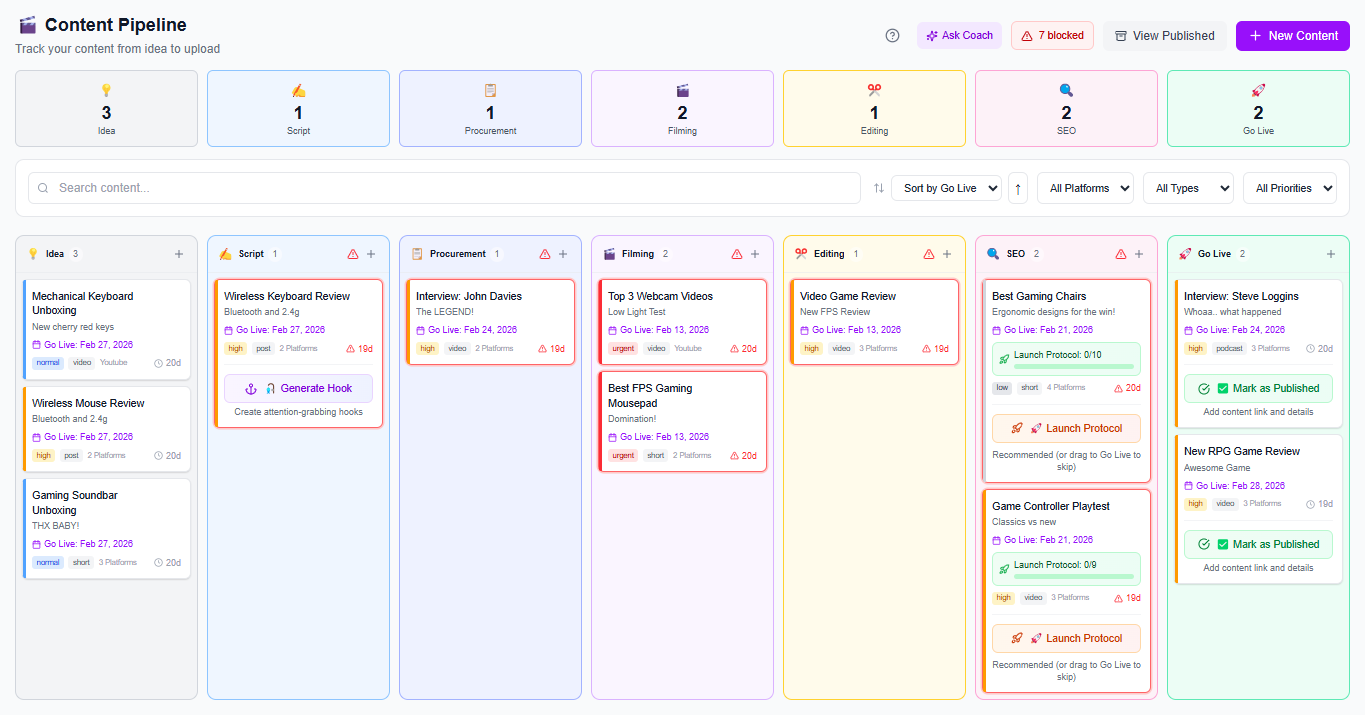
To keep the “week you can keep,” Content Planner & Content Queue lets you schedule everything in advance, while Social Statistics gives cross-platform performance visibility (saves, shares, reach, engagement rate). And when you’re ready to monetize, tools like Rate Calculator, Media Kit, and Pitch Machine support your transition from side hustle to full time by helping you package your work and outreach professionally.
Start with a repeatable week structure: 1 flagship, 2 supporting posts, and 2–3 community posts. Plan topics by content roles (value, proof, offer) rather than random ideas, and schedule in advance using a queue. Then reserve one daily block for repurposing so you’re not rebuilding from scratch.
Your workflow should include: topic selection, hook planning, creation (flagship + repurposes), scheduling, and a weekly performance review. Track only a few metrics (like saves/shares, engagement rate, and reach) so you can make one improvement per week. This keeps the process sustainable and supports how to get more views without burnout.
Yes—use the same idea, but change the format and packaging. For example, the flagship can be a YouTube video while short-form clips pull one lesson, proof, or tool from that episode. Keep the roles consistent across platforms so your audience recognizes your message and learns what to expect.
Use a repeatable week structure: 1 flagship, 2 supporting posts, and 2–3 community/engagement posts.
Build content from roles (value, proof, offer) so your calendar supports growth and conversion.
Turn one idea into many posts with intentional repurposing rules, not random clip cutting.
Track only a few metrics weekly and make one improvement per cycle using real performance data.
Tools like Hook Lab, Content Generator, Content Planner & Content Queue, and Social Statistics make the workflow easier to keep.
Found this helpful? Share it:
iBuildInfluence Team
Creator growth strategist at iBuildInfluence. Helping content creators land brand deals, grow their audience, and build sustainable creator businesses.
Try iBuildInfluence