Creator Tips
How to Plan a Week of YouTube Videos in One Sitting (Fast)
October 16, 2026
Staring at a blank screen? Discover the AI-powered tool that instantly generates viral video ideas, analyzes their potential, and drafts complete scripts—breaking through creator's block in seconds.
Every creator knows that moment: you're staring at a blank screen, and your brain just won't cooperate. Whether you call it creator block, writer's block, or the dreaded creative void, it happens to the best of us. But what if you had a tool that could instantly generate tailored video ideas, analyze their viral potential, and even draft a complete script—all from a single prompt?
The Content Creator tool inside iBuildInfluence's "Build My Audience" pillar is designed to do exactly that. In this guide, we'll walk you through how to use this powerful feature to break through creative barriers, discover high-potential content ideas, and maximize your video strategy across multiple platforms.
The Content Creator tool is built for creators who want actionable direction fast. Unlike generic brainstorming methods, this tool analyzes real-time platform data to compare your ideas against what's currently working on YouTube, Instagram, TikTok, and other platforms. It's not about guessing what might perform well—it's about making informed decisions based on actual audience behavior and algorithmic trends.
Adam, co-founder of iBuildInfluence, emphasizes that this tool solves a specific problem: when you know your niche but lack the momentum to start your next video project. Instead of scrolling endlessly for inspiration, you input your core idea and let the platform generate tailored suggestions, competitive insights, and even a full script framework to build from.
The beauty of this approach is that it works for creators at any stage. Whether you're transitioning from a side hustle to full-time content creation or you're an established channel looking to stay ahead of the YouTube algorithm in 2026, this tool provides the structure and data-driven insights you need.
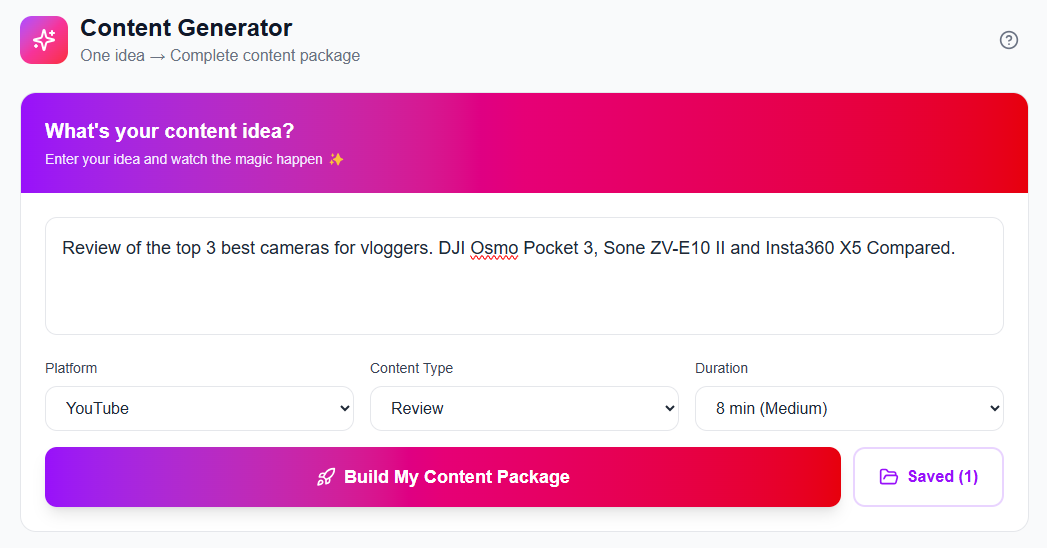
The quality of your output depends entirely on the quality of your input. When most creators first approach the Content Creator tool, they make a common mistake: they're too vague. Typing in "growth hacks" or "how to get more views" won't yield the most tailored results. Instead, you need to feed the tool specific, detailed information about what you actually want to create.
The more detail you plug into your initial idea, the more tailored and curated your results will be. Instead of just "growth," try typing in something like "a really great video on new small creators who are wanting to grow their channel and audience."
After you've entered your content idea, the next step is to specify your platform and content type. Are you creating for YouTube? TikTok? Instagram Reels? And what's your format—short-form, long-form, medium-form? These details matter because each platform has different algorithmic preferences, audience expectations, and content performance patterns. The tool uses this information to calibrate its analysis and recommendations to match what's actually working on that specific platform right now.
Be Specific: Instead of "how to grow," say "practical strategies for creators with under 10k followers to reach 50k in 6 months"
Include Context: Mention your niche, target audience, and the problem you're solving
Specify Your Platform: YouTube, TikTok, Instagram, LinkedIn—each has unique requirements
Choose Your Format: Short-form, medium-form, or long-form video content
Once you've submitted your content idea, the tool generates what might be the most valuable metric: a virality score. This isn't arbitrary—it's calculated by comparing your idea against real-time data from thousands of videos currently performing on your chosen platform. In the example from the demo, an idea about helping small creators grow their channel received a virality score of around 40%, along with detailed feedback explaining why.
The virality score comes with critical insights. The tool identifies if your idea is too vague, if it lacks compelling hooks, if it's oversaturated in the market, or if it faces extreme competition. In the demo, the tool recognized that "how to grow your channel" ranks number one in search volume—but that massive search volume comes with massive competition. Hundreds of established creators are already chasing the same audience with the same message.
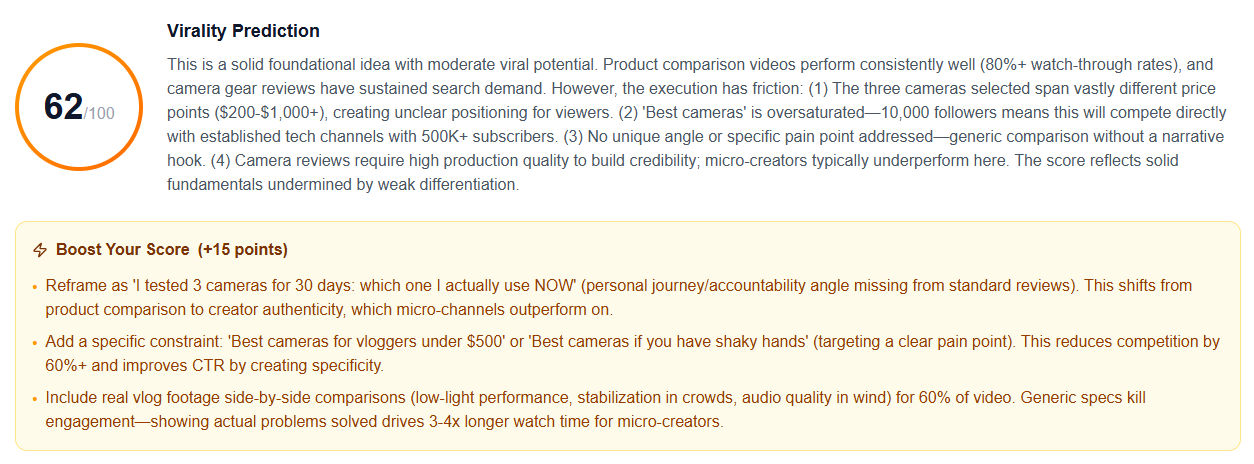
This is where the tool's competitive analysis becomes invaluable. Rather than telling you your idea is dead, it pivots and suggests angles you might not have considered. In this case, it recommended niching down to target micro-creators with 10k followers—a specific, underserved segment with genuine pain points. This kind of strategic niche-down is exactly what separates viral content from the noise.
As a content creator, you've got to really niche down sometimes to get that click-through rate. The tool identifies oversaturated topics and suggests specific angles that can help you stand out from the crowd.
Beyond ideas and virality analysis, the Content Creator tool generates a complete script framework tailored to your video length and platform. If you specified an 8-minute YouTube video, the tool crafts a script with suggested hooks, section breakdowns, detailed talking points for each segment, and even a call-to-action structure.
This isn't meant to be copy-pasted verbatim onto camera. Instead, think of it as a professional starting point—a template that gives you momentum and direction. The tool provides the skeleton; you add your personality, examples, and authentic voice. Using the script as a template rather than gospel is crucial for maintaining your unique brand voice and avoiding the trap of creating generic, AI-generated content that audiences can spot from a mile away.
Review the Generated Script: Read through the entire framework to understand the suggested flow and key points
Personalize the Opening Hook: Rewrite the intro in your own voice and style to match your channel's tone
Add Your Unique Examples: Replace generic examples with real stories and experiences from your own life
Adapt Section Content: Use the script sections as talking points, but expand and adapt them naturally
Customize Your Outro: Ensure your call-to-action aligns with your content strategy and audience expectations
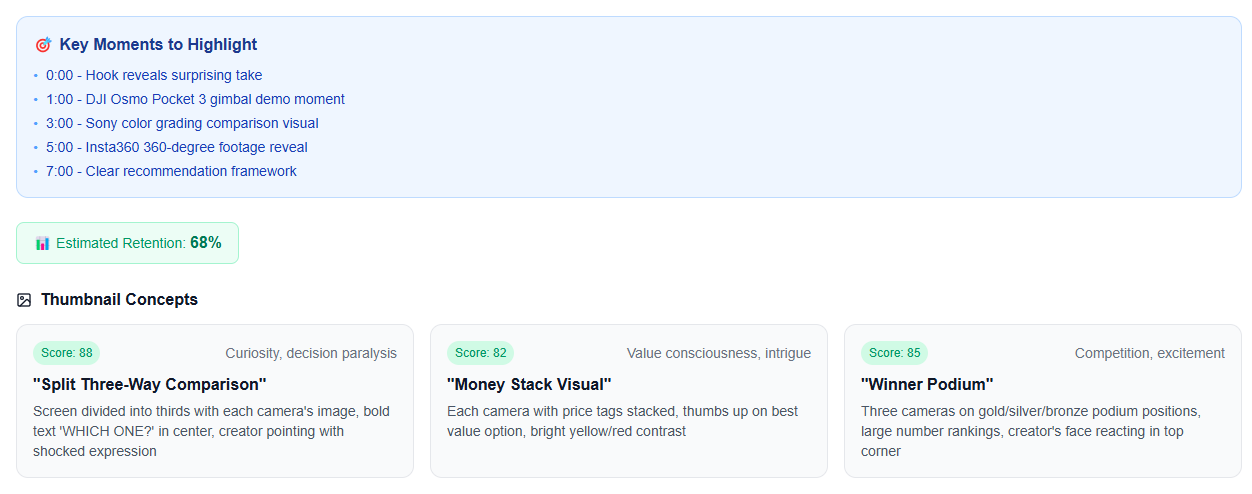
One of the most powerful features of the Content Creator tool is the content multiplication engine. After you've confirmed an idea (say, an 8-minute YouTube video), the tool automatically generates short-form clips, social media posts, carousel templates, and even LinkedIn content—all derived from that single piece of long-form content.
This directly supports an efficient content creator workflow. Instead of filming one video and calling it a day, you now have five to ten content assets ready to deploy across Instagram Reels, TikTok, YouTube Shorts, Twitter/X, and LinkedIn. The tool even provides relevant hashtags and platform-specific optimizations for each asset, saving you hours of repurposing work.
YouTube Shorts: Ready-to-edit clips highlighting your most compelling moments
Instagram Reels: Vertical-format clips optimized for the Instagram algorithm
TikTok Content: Short-form videos with trending music and hashtag recommendations
LinkedIn Posts: Professional takeaways formatted for the LinkedIn audience
Twitter/X Content: Quote-based posts and conversation starters from your video
The tool doesn't stop at content creation—it also identifies monetization opportunities tied directly to your video idea. If you're looking to build income streams beyond ad revenue, the tool suggests relevant affiliate programs, digital course angles, and product partnerships that align with your content.
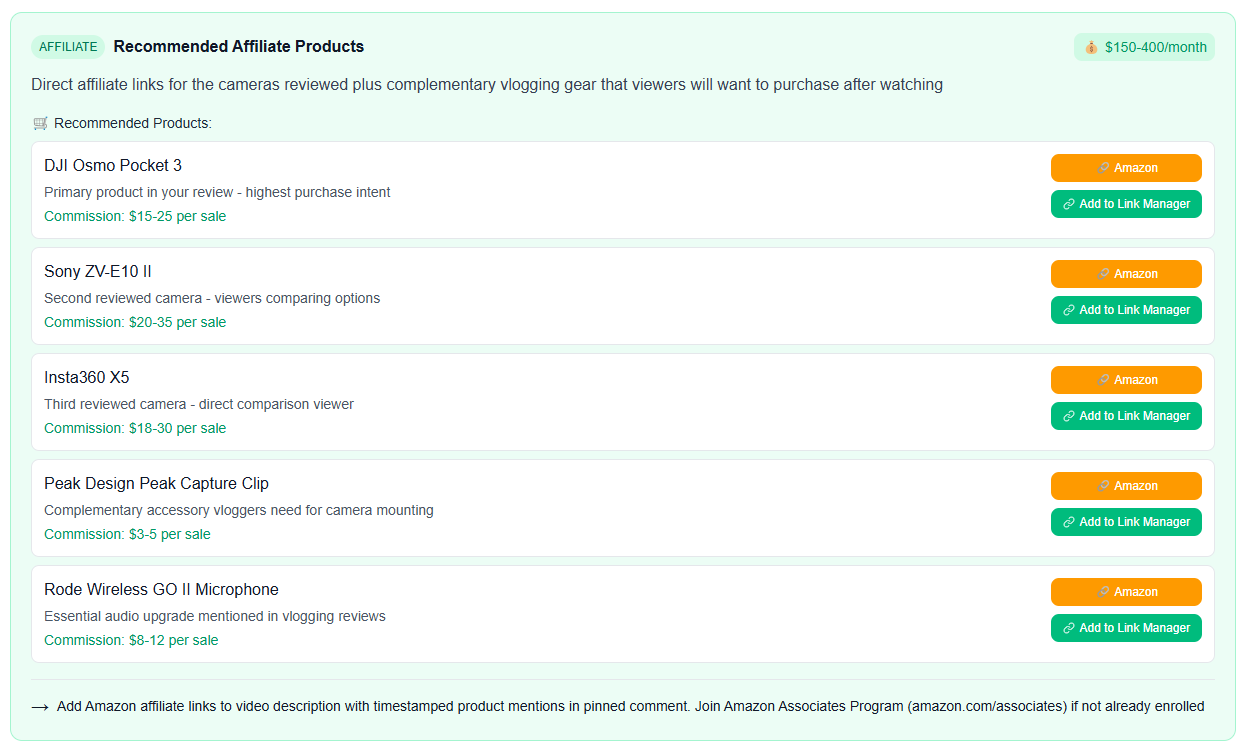
For example, if you're making content about content creation tools, the platform automatically identifies tools like VidIQ and TubeBuddy as relevant affiliate opportunities, complete with direct links to their affiliate programs. It even integrates with iBuildInfluence's link manager, so you can track performance and manage multiple affiliate links from one dashboard. This turns a single video into a potential revenue-generating machine across multiple income channels.
The tool recognizes monetization opportunities—from affiliate programs to digital products—all connected to your content idea. You can then link these directly into your link manager to track performance and earnings automatically.
Detailed Input Leads to Tailored Output: The more specific information you provide about your content idea, the more valuable and personalized the tool's suggestions become
Virality Scores Are Data-Driven: Use the virality score and competitive analysis to understand market saturation and identify high-potential niches
Use Scripts as Templates, Not Gospel: The generated scripts provide direction and momentum, but your authentic voice and unique perspective are what create viral content
Multiply Your Content Efficiently: One video idea can generate 5-10 platform-specific assets automatically, maximizing your content creator workflow and reach
Connect Content to Monetization: The tool identifies affiliate opportunities and income streams directly tied to your video, turning creative work into revenue
Creator block doesn't have to derail your channel. The Content Creator tool in iBuildInfluence provides a data-driven starting point that transforms a vague idea into a complete, multi-platform content strategy. Whether you're struggling to find your next video topic, analyzing whether an idea has viral potential, or simply looking for a script framework to build from, this tool accelerates your creative process and removes the guesswork from content strategy.
The most important thing to remember is that tools are meant to support your creativity, not replace it. Use this feature as your creative partner—let it handle the research, analysis, and initial structuring so you can focus on what you do best: bringing your authentic voice and unique perspective to your audience. Ready to break through your creative block? Head to iBuildInfluence.com, access the Content Creator tool in your Build My Audience pillar, and start generating your next viral-worthy content idea today.
Found this helpful? Share it:
iBuildInfluence Team
Creator growth strategist at iBuildInfluence. Helping content creators land brand deals, grow their audience, and build sustainable creator businesses.
Try iBuildInfluenceJump in and use Today's Focus to pick the one job you will finish.
Open Today's Focus