Creator Tips
Digital Products YouTubers Can Sell This Month
October 15, 2026
Learn how to plan a full week of YouTube content in a single sitting using batching strategies, efficient workflows, and the best software for YouTubers.
Staring at a blank editing timeline while the clock ticks past midnight is a universal creator nightmare. When you treat every video as an isolated emergency, burnout follows fast, views flatten out, and consistency vanishes into thin air. The antidote to this creative exhaustion isn't working harder; it is shifting your process so you can plan a week of YouTube videos in one sitting.
Most creators lose hours each week simply deciding what to film next. By consolidating your brainstorming, outlining, and structuring into a dedicated planning block, you remove the friction of context-switching. Instead of bouncing between writing a script, answering emails, and editing clips on the same afternoon, a single-session sprint lets your brain stay locked in the ideation phase until the entire calendar is full. This approach transforms chaotic scheduling into a predictable content creator workflow that scales right alongside your subscriber count.
To pull this off effectively, you need to separate the architecture of your content from the physical execution of filming. When you try to write a script and set up studio lights at the same time, decision fatigue sets in before you even hit record. Dedicating a specific block of time—say, a Sunday morning—strictly to mapping out your concepts ensures you have a clear roadmap before a single camera battery gets charged. This methodology is also essential if you are trying to turn a part-time passion project into a full-time business, as it protects your weekdays for filming and editing.
Before you write a single title, review what actually worked during your previous upload cycle. Check your analytics to see which videos drove the highest retention rates and brought in new subscribers, rather than just looking at surface-level view counts. Understanding what your audience truly engaged with prevents you from guessing in the dark and helps you map out a cohesive content run for the week ahead. When you align your upcoming topics with proven viewer demand, you significantly boost your chances of satisfying the YouTube algorithm.
Once you have a handful of high-potential concepts, run them through a reality check to ensure they fit your channel's core pillars. If you run a tech channel, a random vlog about grocery shopping might feel fun to film, but it will confuse both your subscribers and the algorithm. Group your winning ideas into a logical sequence for the week—perhaps pairing an in-depth tutorial with a lighter review video or a community Q&A. This variety keeps your audience hooked day after day without burning you out trying to produce blockbusters on zero sleep.
A great video idea dies a quick death if the first three seconds fall flat. During your planning session, write out your primary hook and opening visual for every single video on your weekly schedule. Do not write out every word verbatim unless that is your preferred style; instead, outline the core value proposition, the middle retention tricks, and the final call to action. Getting these structural milestones on paper in one go prevents you from rambling during the actual recording phase.
By treating this scripting phase as a batch process, you can maintain a high-energy tone across all your outlines. If you notice a particular video feels weak in the middle, you can restructure it immediately before wasting hours behind the camera. This is where utilizing the right content creation tools 2026 pays massive dividends, helping you rapidly generate variations of your opening lines and structural frameworks so your retention stays high from start to finish.
The silent killer of a batch-filming day is realizing you are missing a specific cable, prop, or graphic asset halfway through your second setup. The final step of your planning sitting is to build a comprehensive asset checklist for every video on the docket. List out every thumbnail concept, external link, B-roll requirement, and sponsored segment you need to integrate. When your desk is clear and your digital assets are organized into folders, your filming day transforms from a stressful scramble into a smooth, cinematic assembly line.
This organizational discipline also opens the door to repurposing your long-form efforts into short-form goldmines. As you map out your YouTube videos, make a quick note of which segments can be sliced up later, allowing you to turn one YouTube video into multiple pieces of content across TikTok, Instagram Reels, and YouTube Shorts with zero extra planning required.
Consistency is not a character trait; it is a system. When you separate planning from production, you stop relying on motivation and start running a reliable media business.
Keeping your weekly content strategy organized without losing your mind requires a centralized command center designed specifically for modern creators. When you use Creator Calendar, you can map out your entire month of video go-live dates, brand commitments, and custom deadlines on a single grid so you never face a blind spot in your schedule. It connects directly with your production pipeline, letting you transition seamlessly from a blank calendar cell to active video production with just a couple of clicks.
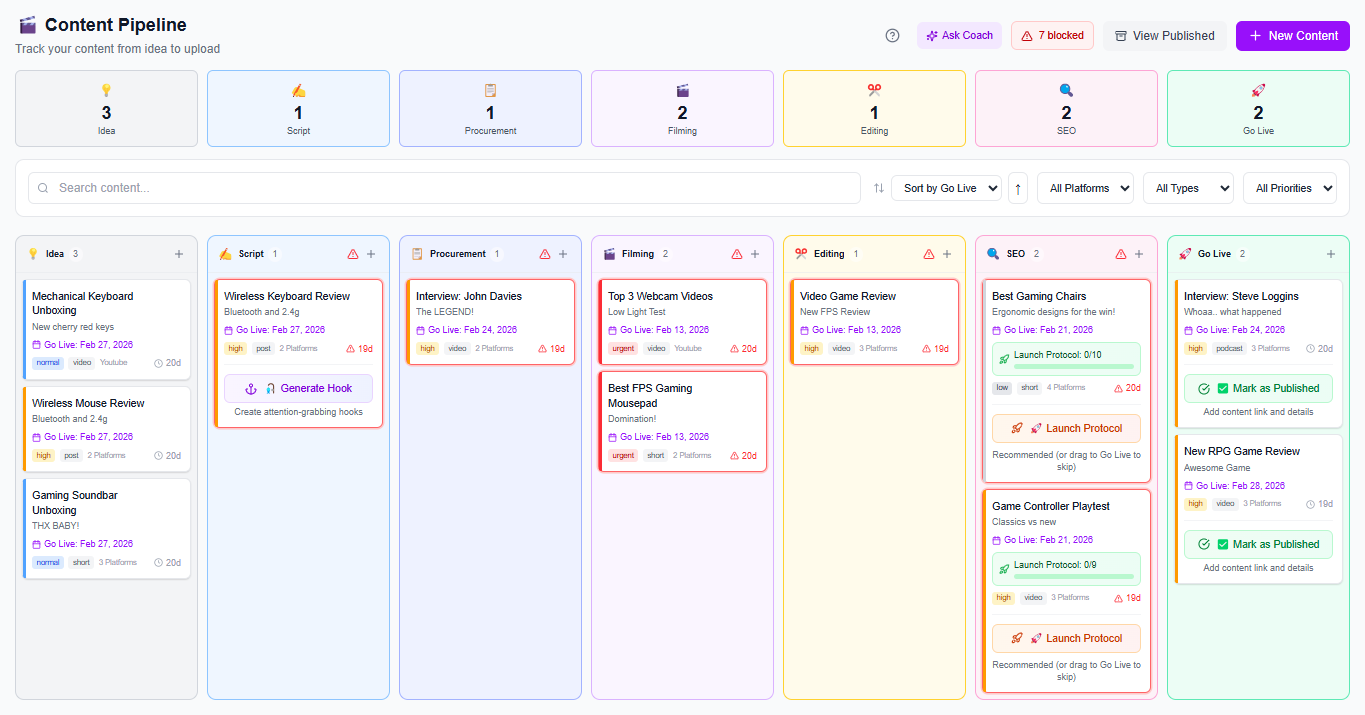
To streamline your actual content creation process during your planning session, the Content Generator acts as your personal producer, taking a rough headline or core topic and transforming it into a complete production blueprint complete with video scripts, SEO-optimized titles, and thumbnail concepts. Pair this with Weekly Rhythm to lock in your daily tasks and track your consistency streak, ensuring that planning a full week of videos in one sitting becomes your repeatable superpower.
A focused planning session typically takes between 90 minutes to two hours if you already have a pool of validated ideas. Trying to rush it in 15 minutes leads to weak hooks, while dragging it out past three hours invites decision fatigue. Set a timer, tackle your ideas in batches, and stick to the schedule.
Rigidity kills momentum, but panic-planning kills consistency. Treat your weekly plan as a flexible baseline rather than an iron cage. If a massive trend drops that directly impacts your niche, swap out one of your lower-priority planned videos for the trend, or use it as a quick short-form piece while keeping your main anchor videos on track.
It depends entirely on your delivery style, but most creators thrive using detailed bullet-point outlines rather than full word-for-word scripts. Bullet points keep your delivery conversational and energetic while ensuring you hit every critical value point without sounding like a robot reading a teleprompter.
Consolidate brainstorming and structuring into a single dedicated session to eliminate daily context-switching.
Review your analytics before planning to ensure your upcoming topics align with proven audience demand.
Prioritize writing strong hooks and structural outlines before you ever touch a camera.
Build comprehensive asset and prop checklists during your planning block to prevent filming delays.
Use reliable digital workflows to keep your content calendar, scripts, and publishing schedule unified in one place.
Found this helpful? Share it:
iBuildInfluence Team
Creator growth strategist at iBuildInfluence. Helping content creators land brand deals, grow their audience, and build sustainable creator businesses.
Try iBuildInfluenceJump in and use Today's Focus to pick the one job you will finish.
Open Today's Focus