Creator Tips
How to Track Brand Deals So You Actually Get Paid
October 18, 2026
Learn how to run your entire creator week in one system—planning, posting, analytics, and brand deals—with iBuildInfluence’s creator tools.
Most creators don’t lose because they lack ideas—they lose because the week is scattered across tabs, spreadsheets, notes apps, and random reminders. If your content creation workflow feels like juggling flaming chains, it’s time to centralize. This guide shows how iBuildInfluence can become the single command center for your creator week: from ideation to posting to performance and brand deals.
Start with a simple rule: your week should begin with decisions, not drafts. A content creator business plan doesn’t need to be complicated—it needs to be consistent. Pick one primary platform (for many creators in 2026, that’s YouTube or TikTok) and two secondary outputs (short-form clips, posts, or newsletters) that support it.
Then map your week around a repeating sequence: plan → produce → schedule → review → pitch.
Here’s a practical example for a solo creator aiming to learn how to get more views and stay consistent. Monday is for planning and hooks, Tuesday and Wednesday are for production (record/edit/script), Thursday is for scheduling and community, and Friday is for outreach plus a quick analytics check. Even if you only make 1 long video per week, you can still generate 10–30 pieces of supporting content—because the work is systemized, not improvised.
This is how you avoid the “post, then panic, then forget why it failed” cycle.
When creators struggle with consistency, it’s often because their process is too manual: they brainstorm for an hour, script for two, then realize the thumbnail/description still isn’t ready. A better approach is one-to-many content planning. Choose a single topic, then generate a full content package that includes scripts, captions, hooks, and angles you can post across multiple days.
Use iBuildInfluence’s Content Generator to turn one idea into a complete set of deliverables. For example, if your weekly theme is “Ai Tools for Small Business in 2026” generate: (1) a short hook list for Shorts, (2) a script outline for a YouTube video, (3) 3–5 post captions that target different viewer pain points, and (4) a set of X & Instagram content topics for your to post.
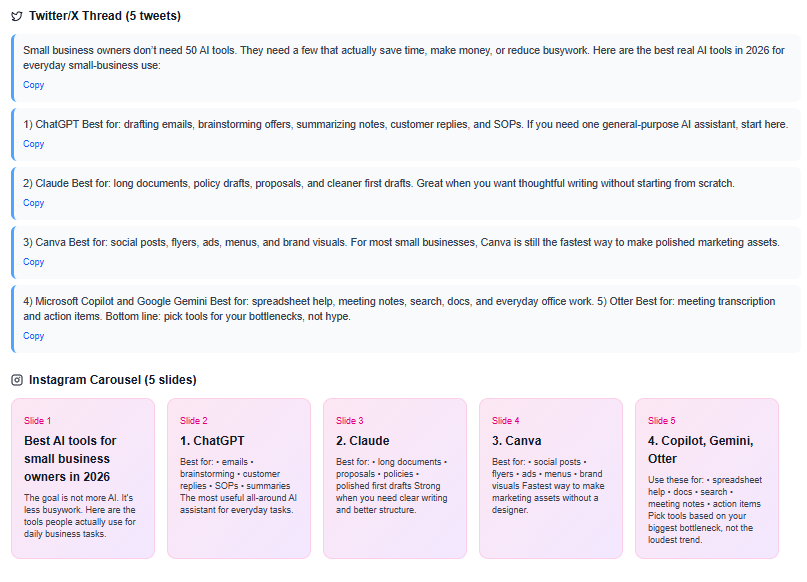
Next, use Hook Lab to generate 30–50 hook variations for your chosen angle and AI-score them so you can quickly select what’s most likely to earn clicks.
Why this matters: hooks aren’t decoration—they directly influence retention and CTR. The psychology is simple: most people don’t “watch content,” they decide whether to keep watching. Your hook needs to create a reason to care within seconds.
If your workflow produces a hook backlog (instead of only one idea), you stop guessing and start shipping.
Scheduling is where many creators stall. They can create, but they don’t build the habit of publishing with momentum. That’s where tools to manage content schedule become more than convenience—they become your accountability.
Create a content queue for the week so your effort is distributed instead of concentrated. The goal is to make “posting” automatic, not stressful.
In iBuildInfluence, use Content Planner & Content Queue to plan multiple posts ahead. For instance, plan one YouTube video release plus three Shorts and two community posts that week. Then schedule them with dates, captions, and links to assets you’ve already produced.
If you batch content on Tuesday/Wednesday, your queue should be preloaded before you start editing—so Thursday is just “publish + engage,” not “scramble for what to post.”
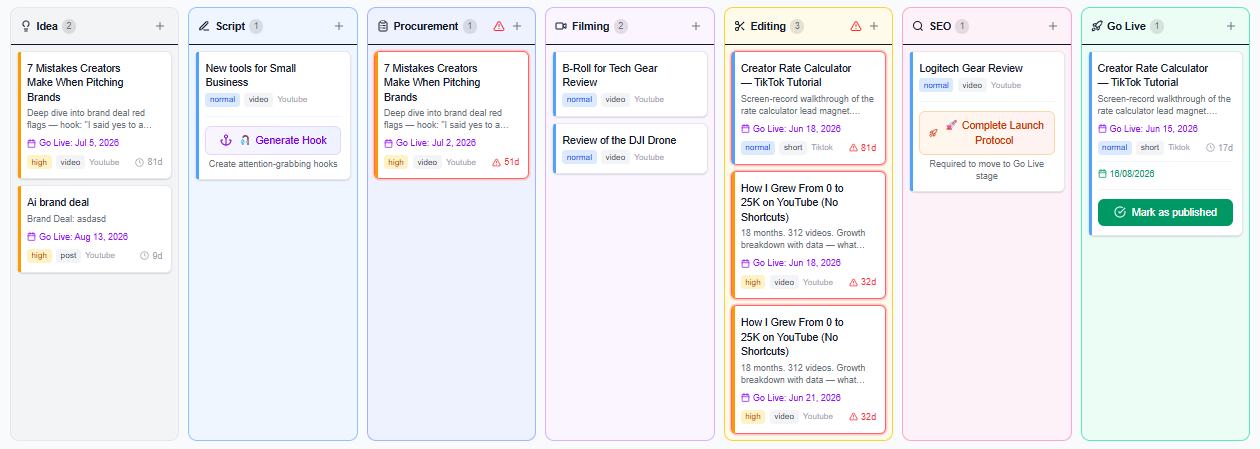
Also use a quick internal QA checklist before scheduling: (1) hook aligns with the video promise, (2) thumbnails/visuals are ready, (3) titles are clear and searchable, and (4) hashtags are relevant (not spammy). If you want a YouTube-focused checklist for discovery, build on the YouTube SEO checklist for titles, descriptions, and tags (2026).
Analytics should not feel like a monthly audit. It should be a weekly course correction. Most creators track views and call it a day, but “views” without context can mislead you.
You need to know which parts of the content pipeline are working: topic selection, hook strength, distribution, and audience response.
Use iBuildInfluence’s Social Statistics to review cross-platform performance like saves, shares, reach, and engagement rate. If one Short gets high saves but low comments, your content may be valuable but not prompting discussion. If a post gets good reach but low click-through, your hook or thumbnail expectations are likely misaligned.
The point isn’t to judge yourself—it’s to adjust next week’s inputs. In practice, you can end Friday with a 20-minute scorecard: keep the top-performing hooks, update underperforming angles, and rewrite titles/descriptions where CTR is low.
Here’s a realistic example of weekly iteration. Suppose your YouTube video topic is “budget editing workflow,” but the first 48 hours show strong CTR from returning viewers and weak CTR from new viewers. That usually points to a title/hook mismatch for discovery.
Your next week’s Shorts can double down on the specific sub-promise that worked (e.g., “edit like a pro in 45 minutes”), while your next long video adjusts the wording to better match search intent.
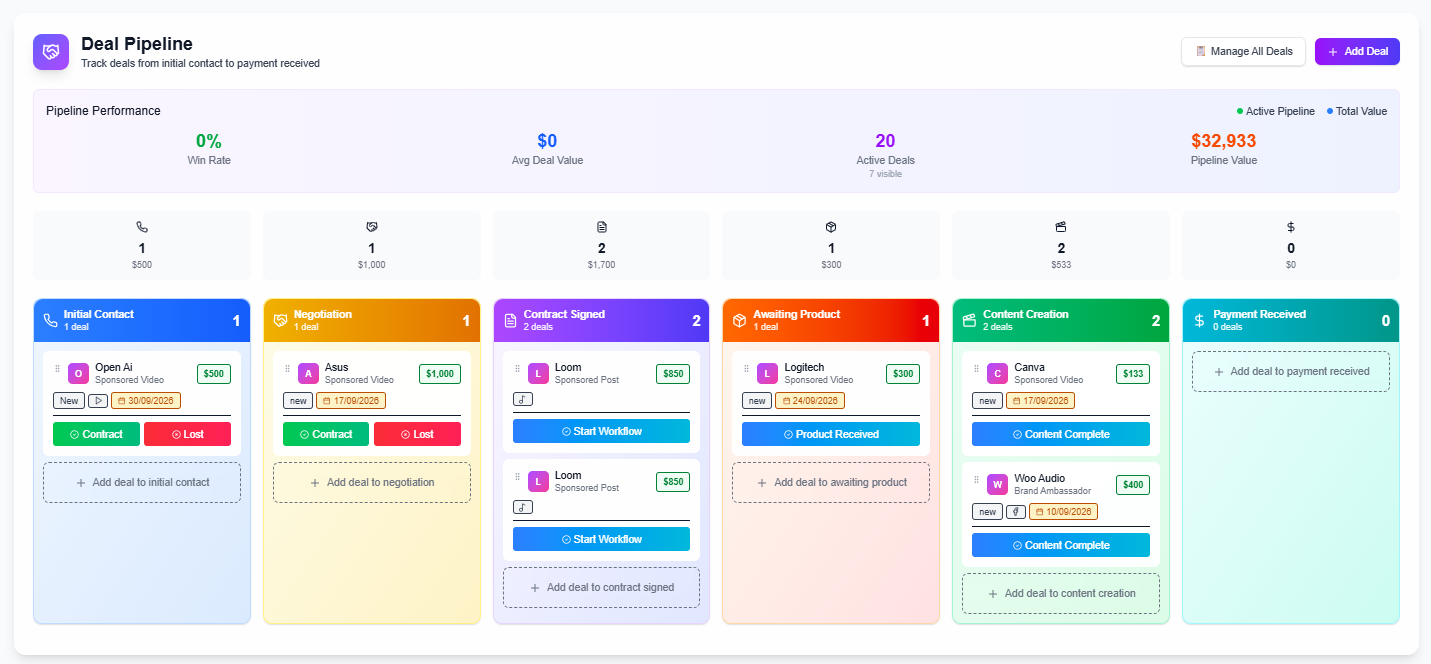
Creators often treat brand outreach as something you do when you’re “free.” But if you want income stability—especially when you’re learning how to transition from side hustle to full time—you need a system. Treat outreach as a deal pipeline: lead → pitch → follow-up → contract → payment. That means no more forgetting who you messaged last month.
In iBuildInfluence, use the Deal Deals to track every opportunity. When you generate brand pitches, use Pitch Machine to draft proposals quickly in your voice and align them to the brand’s goals. Then move the deal card through stages, including follow-ups and status notes.
This reduces “ghosting risk” and helps you plan your outreach week realistically.
For creators who want to sell digital products creator-side (templates, guides, presets, or mini-courses), your outreach should also reflect what you can package and deliver. If brands aren’t buying sponsorships yet, you can still build revenue streams by partnering with affiliates, selling productized resources, or converting audience interest into direct offers. If you’re exploring monetization models, connect your weekly performance review to what you can sell next—because your audience signals what they want.
The creators who grow fastest aren’t posting more—they’re running a tighter week: fewer decisions, faster output, and weekly learning loops that compound.
iBuildInfluence is built specifically for creators who need a unified content creator workflow, not a patchwork of general-purpose tools. Instead of juggling planning docs, hook notes, analytics spreadsheets, and outreach tracking, you can run the entire week inside one platform. With Content Planner & Content Queue, you can schedule weeks of content so publishing doesn’t become a daily scramble, and you can keep your ideas organized around consistent themes.
To improve how you create and win attention, iBuildInfluence includes Content Generator for one-idea-to-many outputs and Hook Lab to generate and score hooks before they go live. For decisions you can trust, Social Statistics helps you review performance signals like engagement and shares across platforms. And when it’s time to earn, the Pitch Machine plus Deal Pipeline helps you move from outreach to contracts with fewer missed steps.
Use a repeatable weekly structure: plan Monday, produce Tue/Wed, schedule Thu, engage and review Fri. Keep your tasks small and batch-based so you’re not switching contexts all day. A scheduling tool with a preloaded queue prevents last-minute panic posting.
The best software helps you plan consistently, generate stronger hooks/titles, schedule ahead, and track performance. iBuildInfluence combines these needs with creator-focused workflow tools like Content Planner & Content Queue, Social Statistics, and outreach/pipeline features for brand deals.
Yes—focus on inputs that influence discovery: searchable topics, compelling hooks, and better packaging (titles, thumbnails, descriptions). Then iterate weekly based on performance data like CTR and engagement signals, not just view counts. A workflow that produces content with intentional hooks and regular analysis is how you steadily improve over time.
Centralize your creator week into a single system: plan, produce, schedule, review, and pitch.
Use one-to-many content planning so one topic turns into multiple posts without extra chaos.
Schedule in advance with a content queue to protect momentum and reduce daily decision fatigue.
Track performance weekly with real signals (reach, engagement, saves/shares) to iterate faster.
Run brand outreach as a pipeline so income goals don’t depend on luck or memory.
Found this helpful? Share it:
iBuildInfluence Team
Creator growth strategist at iBuildInfluence. Helping content creators land brand deals, grow their audience, and build sustainable creator businesses.
Try iBuildInfluenceJump in and use Today's Focus to pick the one job you will finish.
Open Today's Focus