
Income & Monetization
Diversify Beyond YouTube: Multiple Income Streams for Savvy Influencers
September 28, 2026
Learn how YouTube RPM works in 2026, why pay per 1,000 views varies drastically across niches, and use actionable formulas to calculate your earnings.

YouTube pays creators for every 1,000 views through a metric called Revenue Per Mille (RPM), which measures your net earnings after YouTube deducts its platform share. Your payout per 1,000 views swings dramatically based on your production niche, viewer geography, and audience watch time rather than a uniform platform standard. This guide is for monetized creators and growing channels who want to calculate their true channel earnings, understand advertiser demand, and turn AdSense swings into a predictable creator business.
The first decision you must make when analyzing your YouTube revenue is choosing between CPM and RPM as your primary performance metric. Cost Per Mille (CPM) represents the gross dollar amount advertisers pay YouTube to serve 1,000 ad impressions on your video before any platform splits or untracked views are accounted for. Revenue Per Mille (RPM), on the other hand, reports what you actually pocket per 1,000 total video views, including monetized views, non-monetized views from ad-block users, and YouTube Premium splits. Tracking CPM inflates your expectations because not every view serves an ad, while monitoring RPM shows the exact cash entering your payout account.
To calculate your true channel RPM directly from your YouTube Studio analytics, use this standard baseline formula: (Total Estimated Revenue / Total Video Views) * 1,000 = RPM. For a worked example, if your channel generated $420 in estimated revenue over a 30-day window and accumulated 70,000 total views across all uploads, your calculation is ($420 / 70,000) * 1,000, resulting in an RPM of $6.00. Use this figure rather than advertiser CPM when building your YouTube revenue strategy, because RPM accounts for seasonal advertiser demand drops and viewers watching on ad-free tiers.
Your content category determines your earning ceiling because advertisers bid on viewer purchasing power, not creative production effort. High-intent commercial niches—such as personal finance, B2B software, real estate, and web hosting—command massive ad spend because the lifetime value of a single customer who buys a mortgage or opens an investment account is worth thousands of dollars to the sponsor. Entertainment-focused niches like gaming, comedy, vlog commentary, and reaction videos typically command lower payouts because the products advertised tend to be impulse consumer goods with low transaction values. You must decide whether to position your channel as mass-appeal entertainment or high-intent problem solving.
To evaluate the commercial intent of your target niche, calculate your estimated advertiser bidding pressure using this formula: Average Product Price in Topic * Target Customer Conversion Value = Advertiser Willingness to Pay. For example, a channel reviewing project management software targets viewers ready to spend $1,200 annually on SaaS subscriptions, giving software vendors a massive budget to bid on relevant search terms. A gaming channel reviewing free-to-play mobile titles targets viewers with lower commercial urgency, resulting in lower ad bids. When planning your content topics, select problems where a viewer watching your video has immediate intent to purchase a high-value tool, service, or product.
You must decide how to structure your video length and script pacing to qualify for and retain viewers through mid-roll ad breaks. Single-ad placements on short videos deliver only one monetization opportunity per viewer session, keeping your RPM near baseline regardless of the topic. Videos that exceed YouTube's minimum mid-roll placement duration—which you should verify directly in YouTube Help documentation as platform guidelines update—allow you to place multiple ad breaks throughout the runtime. However, overloading a video with mid-roll ads without maintaining audience engagement triggers viewer drop-off, which harms your standing in the YouTube algorithm and decreases total watch time.
To optimize mid-roll placements without destroying your retention, use this ad density formula: Total Video Runtime / (Average View Duration * 0.5) = Maximum Strategic Mid-Roll Points. For a worked example, if you produce a 12-minute tutorial where your audience analytics show an Average View Duration (AVD) of 6 minutes, calculate 12 / (6 * 0.5) to identify that you should place no more than 4 manual ad breaks, spaced around natural narrative transitions. Place your first mid-roll break immediately after your initial hook delivers on its promise, usually around the 3-minute mark, rather than pushing it to the end where viewer retention drops off significantly.
Creators often run into cash flow surprises because they produce videos without estimating their financial break-even point. You need a reliable framework to evaluate whether a proposed production is commercially viable based on your historical analytics. Instead of guessing how much an upload will earn, calculate an expected value range based on your standard click-through rate (CTR), median view count, and established niche RPM. This decision process stops you from spending 40 hours producing a complex video on a low-paying subtopic when a streamlined tutorial on a high-intent topic generates three times the return.
Use this pre-production revenue formula for every planned upload: (Estimated Impressions * Expected CTR / 1,000) * Baseline Niche RPM = Estimated Video AdSense Yield. As a worked example, assume your channel averages 50,000 impressions on a standard video, maintains an 8% CTR, and holds a confirmed $8.50 RPM in the tech education niche. Your calculation is ((50,000 * 0.08) / 1,000) * $8.50, which equals (4,000 views / 1,000) * $8.50, yielding an expected AdSense payout of $34.00. If that upload requires $200 in props or software subscriptions to produce, your AdSense alone will not cover costs, forcing you to incorporate affiliate products or sponsorships to break even.
Relying exclusively on AdSense creates extreme financial volatility because advertising budgets drop substantially during early quarters and fluctuate based on macroeconomic shifts. Your strategic decision should be treating YouTube RPM as a baseline floor for your cash flow rather than your primary income ceiling. High-earning channels use their video views to power secondary revenue streams that are completely independent of advertiser bidding, such as digital products, paid communities, and direct brand integrations. When you diversify, a month with low ad rates does not threaten your creator business stability.
Calculate your total revenue per mille across your entire business ecosystem using this comprehensive formula: ((AdSense Payout + Brand Sponsorships + Digital Product Net + Fan Memberships) / Total Monthly Views) * 1,000 = True Business RPM. For a worked example, if your channel receives 100,000 views in a month and generates $600 from AdSense, $1,500 from a dedicated brand deal, and $900 from selling digital guides, your combined total revenue is $3,000. Applying the formula gives ($3,000 / 100,000) * 1,000, raising your True Business RPM from an ad-only rate of $6.00 to an actual business yield of $30.00 per 1,000 views.
Never build a long-term business plan around ad revenue alone; treat your YouTube RPM as baseline cash flow while designing direct monetization for viewers with commercial intent.
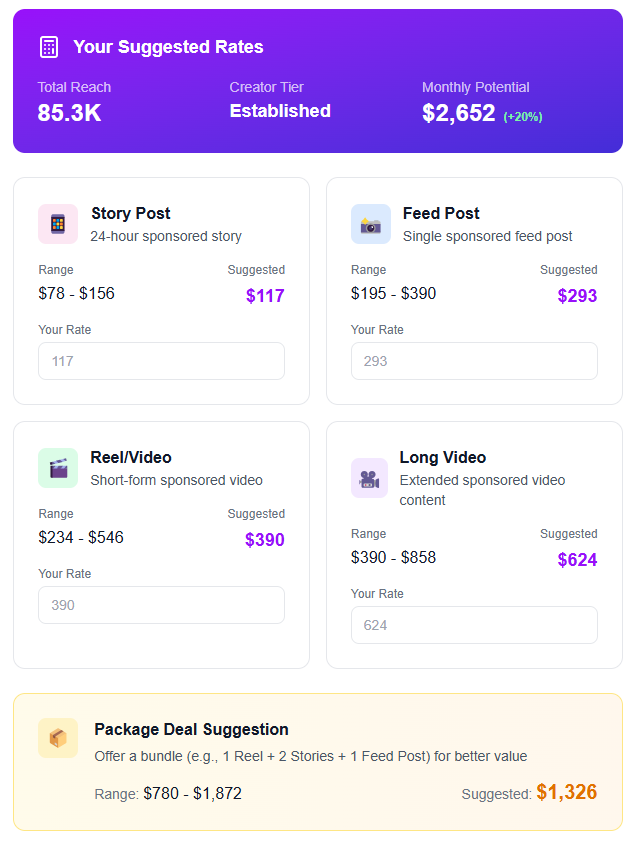
When you want to evaluate your earnings beyond AdSense, open the Rate Calculator to benchmark your channel's commercial value and price sponsored deliverables using verified industry standards rather than guessing what brands should pay. To stop financial leaks across multiple income channels, check My Earnings to view your store sales, brand payments, fan memberships, and platform payouts side by side on one consolidated financial dashboard.
CPM measures what an advertiser pays for every 1,000 ad impressions served on your videos before YouTube takes its platform revenue share. RPM measures your actual take-home earnings per 1,000 total video views after YouTube's cut, factoring in views that did not serve ads and additional revenue sources like YouTube Premium.
Your RPM fluctuates because corporate advertising budgets change seasonally, peaking during the fourth quarter holiday shopping rush and dipping sharply at the beginning of the calendar year. Changes in viewer geography, your video lengths, and the proportion of your viewers using ad-blocking software also cause your monthly RPM to shift.
Yes, you can increase your channel RPM by creating content around high-intent subtopics that attract premium advertiser bids, such as tutorials reviewing specific software or tools. Extending your average view duration and strategically pacing mid-roll ad placements on videos that meet YouTube's minimum duration requirements also raises your payout per view.
RPM represents your actual net earnings per 1,000 views, making it a far more accurate business forecasting metric than gross advertiser CPM.
Niches with high commercial intent and expensive products command substantially higher ad bids than general entertainment or casual lifestyle topics.
Placing mid-roll ads on qualifying long-form videos increases total ad inventory, provided you maintain strong audience retention past the midpoint.
Always estimate an upload's break-even potential using impressions, click-through rate, and historical RPM before investing significant production capital.
Diversify your income with brand deals, memberships, and digital downloads to build a high True Business RPM that survives seasonal ad market downturns.
Found this helpful? Share it:
iBuildInfluence Team
Creator growth strategist at iBuildInfluence. Helping content creators land brand deals, grow their audience, and build sustainable creator businesses.
Try iBuildInfluenceJump in and use Rate Calculator to price your next sponsored post.
Open Rate Calculator